


Filter the glacier length and area time series#
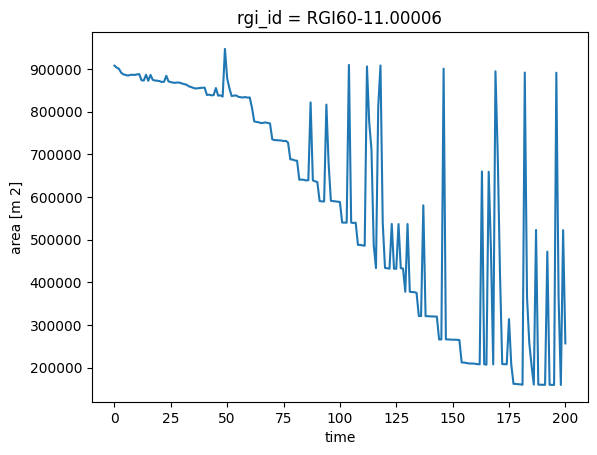
In this short tutorial, we show how to deal with unwanted “spikes” in the length and area time series of individual glaciers. These happen because OGGM currently doesn’t differentiate between snow and ice when computing area and length, i.e. occasional years with large snowfall events can artificially increase the glacier area and length.
There are two ways to address this problem:
Before the run (more robust, recommended if you can afford to re-run): set
cfg.PARAMS['min_ice_thick_for_length'] = 1to exclude thin snow/ice from the length computation.Postprocessing (always applicable): apply a moving minimum filter to the output time series.
We demonstrate both approaches below.
Set-up#
import matplotlib.pyplot as plt
import xarray as xr
import os
from oggm import cfg, utils, workflow, tasks
cfg.initialize()
2026-08-07 07:27:53: oggm.cfg: Reading default parameters from the OGGM `params.cfg` configuration file.
2026-08-07 07:27:53: oggm.cfg: Multiprocessing switched OFF according to the parameter file.
2026-08-07 07:27:53: oggm.cfg: Multiprocessing: using all available processors (N=4)
cfg.PATHS['working_dir'] = utils.gettempdir(dirname='OGGM-Filter')
Define the glaciers for the run#
We take the Hintereisferner in the Austrian Alps:
rgi_ids = ['RGI60-11.00006'] # Random glacier
Glacier directories#
# in OGGM v1.6 you have to explicitly indicate the url from where you want to start from
# we will use here the elevation band flowlines which are much simpler than the centerlines
base_url = ('https://cluster.klima.uni-bremen.de/~oggm/gdirs/oggm_v1.6/'
            'L3-L5_files/2025.6/elev_bands/W5E5/per_glacier')
gdirs = workflow.init_glacier_directories(rgi_ids, from_prepro_level=5, prepro_border=80,
                                         prepro_base_url=base_url)
2026-08-07 07:27:53: oggm.workflow: init_glacier_directories from prepro level 5 on 1 glaciers.
2026-08-07 07:27:53: oggm.workflow: Execute entity tasks [gdir_from_prepro] on 1 glaciers
Run#
We can step directly to a new experiment! This runs under a random climate representative for the recent climate (1980-2010) and a small warm temperature offset:
workflow.execute_entity_task(tasks.run_random_climate, gdirs,
                             nyears=200, y0=1995, seed=5, temperature_bias=0.5,
                             output_filesuffix='_commitment');
2026-08-07 07:27:53: oggm.workflow: Execute entity tasks [run_random_climate] on 1 glaciers
2026-08-07 07:27:53: oggm.core.flowline: (RGI60-11.00006) run_random_climate_commitment
2026-08-07 07:27:53: oggm.core.flowline: (RGI60-11.00006) flowline_model_run_commitment
The problem#
ds = utils.compile_run_output(gdirs, input_filesuffix='_commitment')
ds = ds.isel(rgi_id=0)  # take just the one glacier
2026-08-07 07:27:54: oggm.utils: Applying global task compile_run_output on 1 glaciers
2026-08-07 07:27:54: oggm.utils: Applying compile_run_output on 1 gdirs.
ds.area.plot();
ds.length.plot();
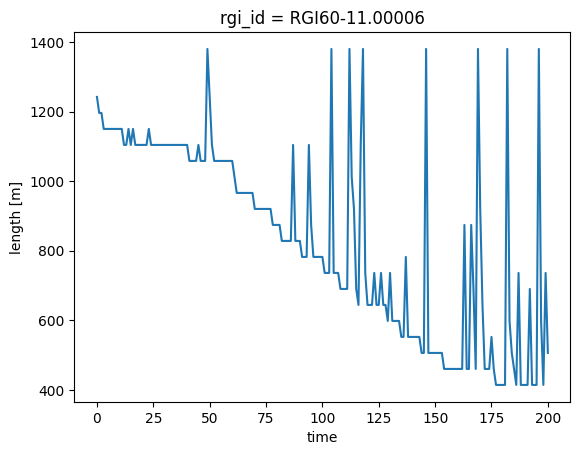
For small areas, the glacier has the unrealistic “spikes” described above.
Solutions#
Solution 1: Set min_ice_thick_for_length before the run (recommended for length)#
If you can afford to re-run, the most robust fix for length spikes is to set cfg.PARAMS['min_ice_thick_for_length'] = 1 before running. This instructs OGGM to only include grid points with at least 1 m of ice when computing the glacier length, effectively ignoring thin seasonal snow patches. We re-run the same experiment with this setting:
cfg.PARAMS['min_ice_thick_for_length'] = 1  # only count ice/snow >= 1 m thick for length

workflow.execute_entity_task(tasks.run_random_climate, gdirs,
                             nyears=200, y0=1995, seed=5, temperature_bias=0.5,
                             output_filesuffix='_commitment_filtered');
2026-08-07 07:27:54: oggm.cfg: PARAMS['min_ice_thick_for_length'] changed from `0.0` to `1`.
2026-08-07 07:27:54: oggm.workflow: Execute entity tasks [run_random_climate] on 1 glaciers
2026-08-07 07:27:54: oggm.core.flowline: (RGI60-11.00006) run_random_climate_commitment_filtered
2026-08-07 07:27:54: oggm.core.flowline: (RGI60-11.00006) flowline_model_run_commitment_filtered
ds_f = utils.compile_run_output(gdirs, input_filesuffix='_commitment_filtered')
ds_f = ds_f.isel(rgi_id=0)

# Compare length with and without the parameter
ds.length.plot(label='Default (min_ice_thick_for_length=0)')
ds_f.length.plot(label='min_ice_thick_for_length=1')
plt.legend();
2026-08-07 07:27:55: oggm.utils: Applying global task compile_run_output on 1 glaciers
2026-08-07 07:27:55: oggm.utils: Applying compile_run_output on 1 gdirs.
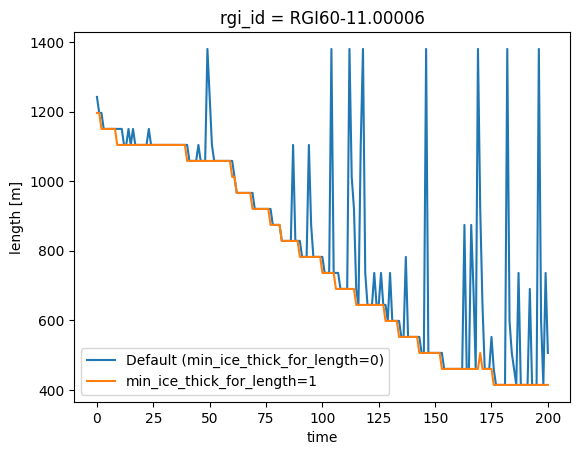
Note: min_ice_thick_for_length only affects length, not area. Area can still exhibit spikes. For area (or if you cannot re-run) use the postprocessing approach in Solution 2 below.
We are aware that this could be used for area as well, and this feature will be available soon.
Also note that this parameter changes the model behaviour, so make sure to set it before any run where you want it applied. If you run other experiments in the same session, you can reset it with:
cfg.PARAMS['min_ice_thick_for_length'] = 0 # reset to default
2026-08-07 07:27:55: oggm.cfg: PARAMS['min_ice_thick_for_length'] changed from `1` to `0`.
Solution 2: Postprocessing (always applicable)#
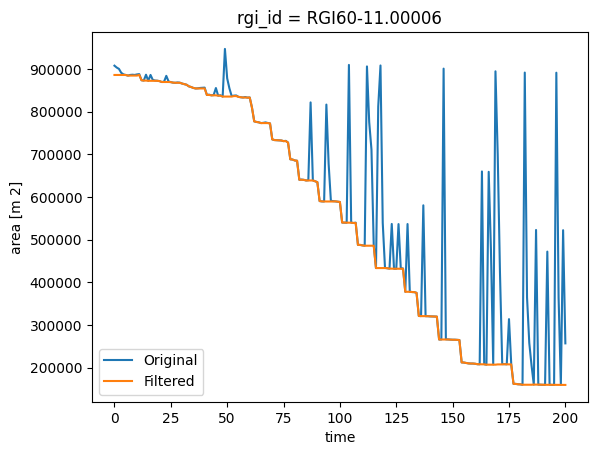
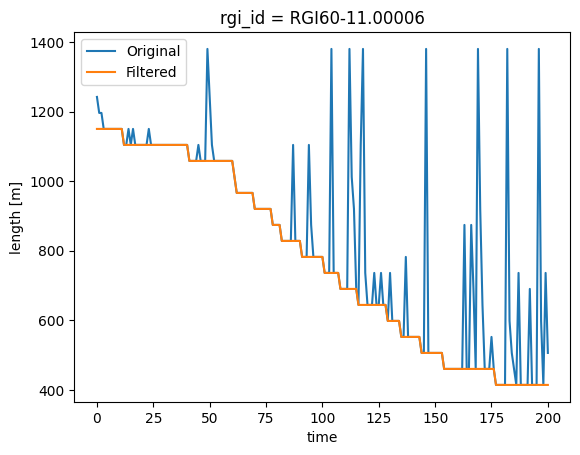
If you cannot or do not want to re-run, a good postprocessing workaround is to apply a moving minimum filter, which keeps the smallest area or length in a given window size. This works for both area and length:
roll_yrs = 5
# Take the minimum out of 5 years
ts = ds.area.to_series()
ts = ts.rolling(roll_yrs).min()
ts.iloc[0:roll_yrs] = ts.iloc[roll_yrs]
# Plot
ds.area.plot(label='Original')
ts.plot(label='Filtered')
plt.legend();
It works the same with length:
# Take the minimum out of 5 years
ts = ds.length.to_series()
ts = ts.rolling(roll_yrs).min()
ts.iloc[0:roll_yrs] = ts.iloc[roll_yrs]
# Plot
ds.length.plot(label='Original')
ts.plot(label='Filtered')
plt.legend();
What’s next?#
return to the OGGM documentation
back to the table of contents